In today’s fast-moving digital world, design speed matters as much as design quality. Whether you’re a small business owner, blogger, marketer, student, or content creator, you need eye-catching visuals—fast. That’s where Adobe Express Premium steps in.
Built by Adobe, Adobe Express Premium combines professional-grade tools with beginner-friendly simplicity. Think of it as Canva-level ease with Adobe-level power.
We’ll break down what Adobe Express Premium really offers, how it compares to the free version, real-life use cases, pros & cons, common mistakes, FAQs
What Is Adobe Express Premium?
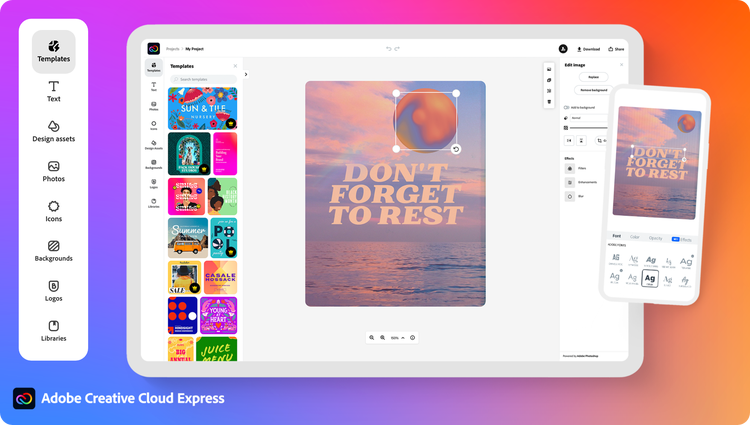
Adobe Express Premium is the paid version of Adobe Express, an all-in-one online design tool that lets you create:
- Social media posts
- YouTube thumbnails
- Posters & flyers
- Logos & brand kits
- Reels, short videos & stories
- PDFs, resumes & presentations
Unlike complex tools like Photoshop or Illustrator, Adobe Express focuses on speed, automation, and templates, making professional design accessible to everyone.
Adobe Express Free vs Premium: What’s the Real Difference?
| Feature | Free Version | Premium Version |
|---|---|---|
| Templates | Limited | 100,000+ premium templates |
| Stock photos & videos | Very limited | Millions of Adobe Stock assets |
| Brand Kit | ❌ | ✅ (Logos, fonts, colors) |
| Background removal | ❌ | ✅ One-click |
| Resize designs | ❌ | ✅ Magic Resize |
| Video export | Limited | Full HD & premium effects |
| Fonts | Basic | Premium fonts |
| Commercial use | Limited | Fully allowed |
Expert verdict: If you create content regularly, the Premium version pays for itself quickly.


Key Features of Adobe Express Premium (Expert Breakdown)

1. Premium Templates (Huge Time Saver)
Adobe Express Premium gives access to professionally designed templates for every platform:
- Instagram, Facebook, X (Twitter)
- YouTube, Shorts, Reels
- Business flyers, brochures
- Resume & portfolio layouts
Templates are editable in seconds—just replace text, colors, or images.
2. Adobe Stock Access (Photos, Videos & Music)
Premium users unlock millions of high-quality Adobe Stock assets, including:
- Royalty-free images
- Background videos
- Motion elements
- Music tracks
This alone can save thousands in stock subscriptions.
3. One-Click Background Remover
No Photoshop skills needed.
- Remove image backgrounds instantly
- Perfect for product photos, profile pics, posters
- Works on web & mobile
This feature is widely used by eCommerce sellers and influencers.
4. Brand Kit for Consistent Branding
Brand consistency builds trust.
With Adobe Express Premium, you can save:
- Logos
- Brand colors
- Fonts
Every design automatically follows your brand identity—huge win for businesses.
5. Magic Resize (Create Once, Publish Everywhere)
Design once → resize instantly for:
- Instagram post
- Story
- Facebook ad
- YouTube thumbnail
This is a game-changer for social media managers.
6. Video Creation & Animation Tools
Adobe Express Premium is not just for static designs.
You can:
- Create short promo videos
- Add animations & transitions
- Export HD videos
- Create Instagram Reels & YouTube Shorts
Perfect for creators who want fast video content without heavy editing tools.
7. Cross-Device Access (Web + Mobile)
Design on:
- Laptop
- Tablet
- Smartphone
Everything syncs automatically with your Adobe account.
Who Should Use Adobe Express Premium?
✅ Best For:
- Bloggers & website owners
- Social media managers
- YouTubers & podcasters
- Small business owners
- Digital marketers
- Freelancers
- Students & teachers
❌ Not Ideal For:
- Advanced photo retouching
- Complex vector illustration
- Heavy cinematic video editing
(For those, Photoshop, Illustrator, or Premiere Pro are better.)
Real-Life Use Cases (Expert Examples)
1. Blogger Creating Featured Images
A blogger can create:
- SEO-friendly blog banners
- Pinterest pins
- Social share images
—all in under 10 minutes.
2. Small Business Promotion
A local business can:
- Design posters
- Instagram ads
- WhatsApp marketing creatives
without hiring a designer.
3. Influencers & Creators
Perfect for:
- Thumbnails
- Stories
- Reels covers
- Profile branding
4. Students & Educators
Great for:
- Presentations
- Projects
- Posters
- Visual assignments
Adobe Express Premium Pricing (India & Global)
Pricing may vary slightly by region, but generally:
- Monthly Plan: Affordable for short-term needs
- Annual Plan: Best value (significant savings)
Adobe often bundles Express Premium with other Adobe plans or offers discounts for students and educators.
Pros & Cons of Adobe Express Premium
✅ Pros
- Extremely beginner-friendly
- Professional templates
- Huge stock library
- Fast design workflow
- Works on web & mobile
- Brand kit & resize tools
❌ Cons
- Less advanced than Photoshop
- Limited customization for complex designs
- Requires internet connection
Common Mistakes Users Make
- Ignoring Brand Kit – leads to inconsistent branding
- Overusing templates without customization
- Not resizing for each platform
- Using low-contrast text
- Exporting in wrong dimensions
Avoid these to get pro-level results.
Expert Tips to Get the Most from Adobe Express Premium
- Customize templates—don’t just replace text
- Use brand colors consistently
- Keep designs clean and readable
- Use Adobe Stock videos for motion posts
- Preview designs before publishing
Adobe Express Premium FAQs
1. Is Adobe Express Premium worth it?
Yes, especially for content creators, businesses, and marketers who design regularly.
2. Can I use Adobe Express Premium for commercial projects?
Yes, all Premium assets are allowed for commercial use.
3. Does Adobe Express Premium include Photoshop?
No, it’s a separate simplified design tool.
4. Can beginners use Adobe Express Premium?
Absolutely. No design experience required.
5. Is Adobe Express better than Canva?
Adobe Express offers stronger branding tools and Adobe Stock integration, while Canva has more third-party apps. Choice depends on needs.
6. Does Adobe Express Premium work offline?
No, it requires an internet connection.
7. Can I cancel Adobe Express Premium anytime?
Yes, depending on your plan and region.
8. Is Adobe Express Premium good for YouTube thumbnails?
Yes, it’s excellent for thumbnails and channel branding.
9. Does it support team collaboration?
Yes, Premium supports shared projects and collaboration.
10. Can students get Adobe Express Premium free?
Students often get discounts or free access via educational plans.
Conclusion: Should You Buy Adobe Express Premium?
If you want fast, professional, and consistent designs without complexity, Adobe Express Premium is a smart investment. It bridges the gap between beginner tools and professional design software—perfect for today’s content-driven world.